
Blog

Why Does My Phone Charge Slowly? 10 Common Causes and Fixes
Why does my phone charge slowly? The most common reasons are a low-power or incompatible charger, damaged charging cable, dirty charging port, high phone temperature, heavy background apps, or an aging battery. Using a compatible fast charger and quality charging cable, keeping the phone cool, and checking the charging port can often improve charging speed. If the phone remains slow with different compatible chargers and cables, the battery or charging port may need professional inspection.
A phone that takes hours to reach a full charge can be frustrating, especially when you need it before leaving home. Why does my phone charge slowly? The most common reasons include a weak or incompatible charger, damaged charging cable, dirty charging port, high phone temperature, background activity, or an aging battery.
Slow charging doesn’t always mean the phone battery is failing. In many cases, replacing the cable, using a compatible fast charger, cleaning the charging port carefully, or reducing phone usage while charging can make a noticeable difference. This guide explains the main causes of slow phone charging, how to identify the problem, and what you can do to restore normal charging performance.
Why does my phone charge slowly? A phone may charge slowly because the charger or cable cannot deliver enough power, the charging port has debris, the device is too hot, or the battery and charging system are limiting power for protection.
Modern smartphones don’t continuously charge at their maximum advertised speed. Charging speed can change according to battery level, temperature, charger capability, cable specifications, and the phone’s charging protocol.
Common causes include:
- Low-power or incompatible charger
- Damaged or poor-quality charging cable
- Dust or lint inside the charging port
- Fast charging not supported or enabled
- Phone overheating
- Heavy apps running during charging
- Weak power source or damaged adapter
- Battery aging or battery health issues
- Moisture detection or charging protection
- Charging limitations built into the phone
The first step is to identify whether the problem is caused by the charger, cable, phone, power source, or battery.
How Charging Speed Actually Works
Charging speed depends on more than the wattage printed on a charger. The phone, charger, and cable must work together using compatible charging standards.
For example, USB Power Delivery (USB PD) allows compatible devices and chargers to negotiate an appropriate power level. Other manufacturers may use proprietary fast-charging systems with their own requirements.
A 65W charger doesn’t automatically make every smartphone charge at 65W. The phone determines how much power it can accept.
Why Is My Phone Charging Slowly Even With a Fast Charger?
A fast charger can still charge a phone slowly when the cable, phone, charging protocol, temperature, or battery condition limits the available power. The charger rating alone doesn’t guarantee maximum charging speed.
If you’re using a 65W or higher charger, check whether your smartphone actually supports that charging level. Also check whether the charger supports the charging technology required by your phone.
Check the Charging Cable
The cable is one of the most overlooked causes of slow charging.
A damaged cable, loose connector, worn internal wires, or cable with limited power capability can prevent the phone from receiving the expected charging current.
Look for:
- Frayed or damaged insulation
- Loose connectors
- Bent connector ends
- Intermittent charging
- Cable that becomes unusually hot
- Charging that starts and stops
- A cable that only charges quickly when positioned at a particular angle
If another compatible cable charges the same phone significantly faster, the original cable is likely part of the problem.
Check Charger Compatibility
The charger should support the phone’s required charging standard and power level.
For USB-C devices, compatibility may involve USB Power Delivery, USB-C charging specifications, or manufacturer-specific fast-charging technologies. For older devices, the requirements can be different.
Using an appropriate phone charger and charging cable together is more important than simply choosing the charger with the highest wattage.
USB-C PD vs Quick Charge: Choosing the Right Fast Charging Accessories
Understanding USB-C PD vs Quick Charge can help you choose the right fast charging accessories for your smartphone and other devices. USB Power Delivery (USB PD) is a widely supported charging standard that can deliver different power levels based on device requirements, while Quick Charge is a fast-charging technology developed by Qualcomm. Before buying a charger or cable, check your device’s supported charging standard, power requirements, and cable compatibility to get reliable charging performance.
Several hardware, software, and environmental factors can cause slow phone charging. Identifying the exact cause is easier when you test one component at a time.
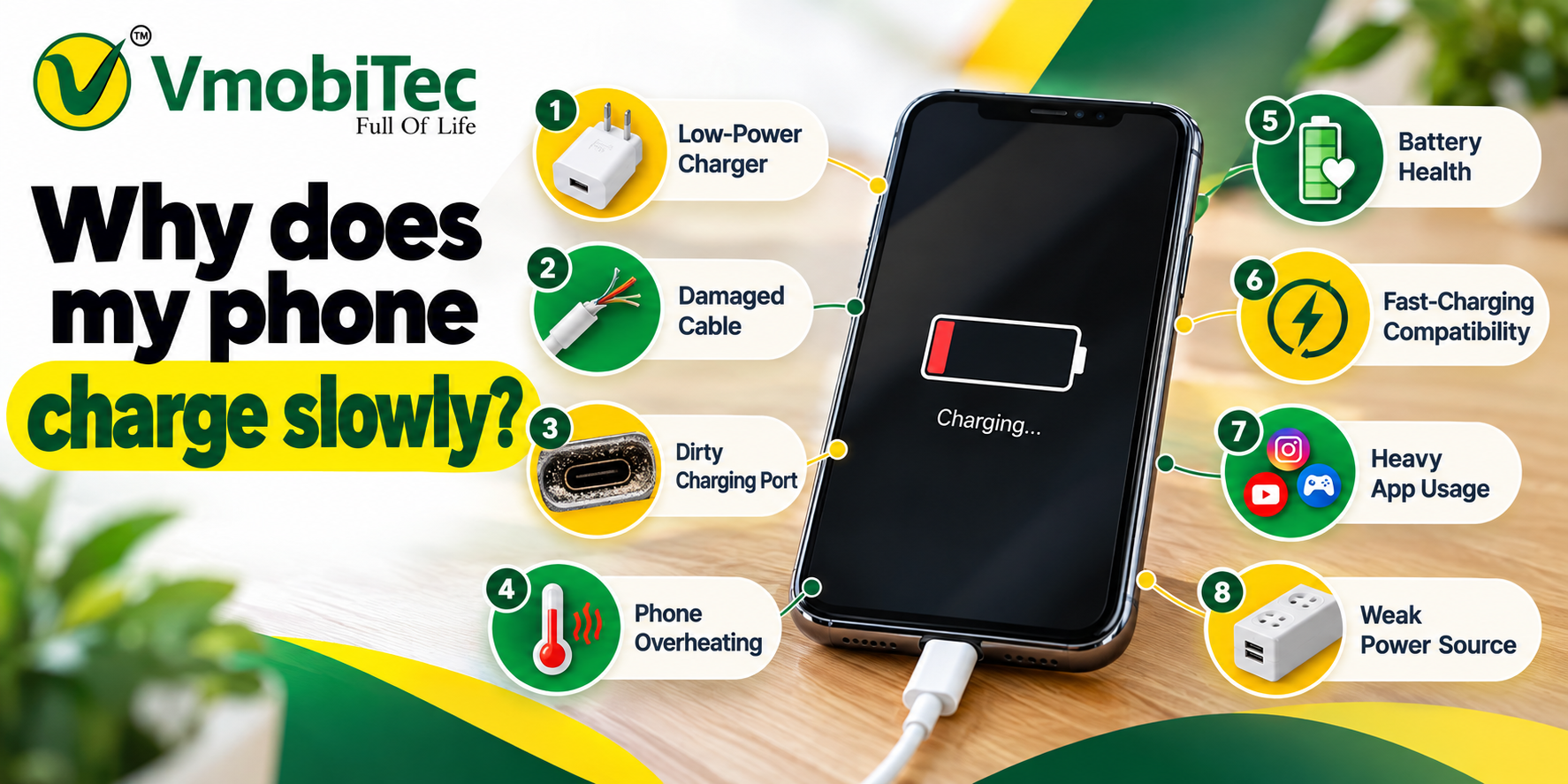
1. You Are Using a Low-Power Charger
Older or low-output chargers may provide less power than your smartphone can accept.
For example, if your phone supports a higher charging rate but you’re using an older low-wattage adapter, the phone may charge normally but much more slowly.
Fix: Use a compatible charger with the appropriate output for your smartphone.
2. The Charging Cable Is Damaged
A cable can look fine externally while having internal damage. Frequent bending near the connector can eventually affect charging performance.
Fix: Test another high-quality compatible cable. If charging speed improves, replace the old cable.
3. The Charging Port Is Dirty
Dust, lint, and debris can accumulate inside a phone’s charging port. This may prevent the connector from sitting correctly against the contacts.
A dirty port can cause slow charging, intermittent charging, or a connection that breaks when the cable moves.
Fix: Inspect the port under good lighting. If cleaning is necessary, use a safe, manufacturer-recommended method and avoid forcing sharp metal objects into the port.
4. Your Phone Is Too Hot
Heat can cause smartphones to reduce charging power to protect the battery and internal components.
Gaming, video streaming, navigation, direct sunlight, or charging under a pillow or blanket can increase temperature.
Fix: Stop demanding apps temporarily and move the phone to a cooler, well-ventilated location while charging.
5. You’re Using the Phone While Charging
Running games, video calls, GPS navigation, streaming, or other demanding applications consumes power while the phone is trying to charge.
The result can be much slower net battery gain.
Fix: Leave the screen off when practical and close demanding applications while charging.
6. Battery Health Has Declined
Lithium-ion batteries naturally lose capacity as they age and go through charge cycles.
Battery degradation can affect overall battery life and, depending on the device, charging behavior.
Fix: Check your phone’s battery health or battery diagnostics if that feature is available. If the battery is significantly degraded, professional replacement may be appropriate.
7. The Phone Is Near Full Charge
Charging speed isn’t necessarily constant from 0% to 100%.
Many smartphones reduce charging power as the battery approaches a high state of charge. This helps manage heat and battery stress.
So, if your phone charges quickly from a low percentage but becomes noticeably slower near the top, that behavior may be normal.
8. Fast Charging May Not Be Active
Some phones display a message such as fast charging, rapid charging, or another manufacturer-specific charging indicator.
If the phone only shows standard charging, check the device’s charging settings and confirm that the charger and cable support the required protocol.
9. The Power Source Is Weak
Charging from a laptop, car USB port, old power bank, or low-output adapter may provide less power than a modern wall charger.
Fix: For testing, connect the phone directly to a compatible wall charger and compare charging performance.
10. Software or System Protection Is Limiting Charging
Some smartphones use battery protection features that intentionally control charging behavior.
Features such as optimized charging, adaptive charging, battery protection, or charging limits may delay charging or stop the battery at a selected percentage.
These features are designed to reduce battery stress rather than indicate a hardware failure.
Why Is My Phone Charging Slowly Overnight?
A phone may charge slowly overnight because of battery protection features, a low-power adapter, poor cable connection, or charging behavior designed to reduce long-term battery stress.
Many modern smartphones can modify charging behavior based on usage patterns. A phone may reach a certain level, pause or slow charging, and finish closer to the expected time you normally unplug it.
If the phone remains at a low percentage for most of the night, however, check the charger, cable, port, and power source.
A useful test is to charge the phone with a known-compatible wall charger and cable while the device is idle. Compare the result after 30–60 minutes.
Why Is My Phone Charging Slowly With a New Charger?
A new charger can still charge slowly if it doesn’t support the phone’s required charging protocol, if the cable is limiting power, or if the phone itself is restricting charging.
A higher wattage number doesn’t automatically mean faster charging.
For example, buying a 100W charger for a phone designed to accept a much lower charging rate won’t force the phone to charge at 100W. The smartphone controls the power it accepts.
Check these three components together:
| Component | What to Check | Possible Problem |
|---|---|---|
| Phone | Maximum supported charging power | Phone has a lower charging limit |
| Charger | Output and charging protocol | Incompatible or low-power adapter |
| Cable | Power and data specifications | Damaged or unsuitable cable |
| Port | Cleanliness and physical condition | Dust, lint or loose connection |
| Power source | Wall outlet or USB output | Insufficient power |
This is why troubleshooting the entire charging setup is more useful than replacing only the adapter.
Choose Reliable Charging Accessories from VMobiTec
If you’re wondering why does my phone charge slowly, the charger and cable are two of the first things to check. VMobiTec offers a range of mobile charging accessories, including fast chargers, USB charging cables, power banks, and other smartphone accessories designed for everyday use. Choosing a compatible charger and quality charging cable can help provide more consistent charging performance and reduce common issues caused by unsuitable or damaged accessories. Explore VMobiTec for affordable charging solutions and mobile accessories for smartphone users across India.
How To Fix Slow Phone Charging
The fastest way to fix slow phone charging is to test the charger, cable, port, temperature, and power source systematically. Start with simple checks before considering battery replacement or professional repair.
1. Use a Compatible Wall Charger
Connect your phone directly to a suitable wall charger rather than a low-output USB port.
Choose a charger that supports the charging standard and power level recommended for your smartphone.
2. Replace the Charging Cable
Try another known-good cable that is compatible with your device.
If charging becomes noticeably faster, the original cable may be damaged or unsuitable for the required charging speed.
3. Check the Charging Port
Inspect the port for visible dust, lint, corrosion, or physical damage.
Don’t insert needles, pins, knives, or other sharp metal objects into the port. If the connector doesn’t fit properly or the port appears damaged, professional service is safer.
4. Let the Phone Cool Down
If the phone feels unusually warm, disconnect it temporarily and allow it to return to a normal temperature.
Avoid charging under bedding, inside enclosed spaces, or in direct sunlight.
5. Stop Heavy Tasks
Close games, video editors, navigation apps, and other demanding processes while charging.
Turning off the display can also reduce power consumption and help the battery gain charge faster.
6. Test a Different Power Outlet
A simple outlet test can rule out problems with the power source or charging accessories.
charger overheating fix directly to another reliable wall outlet and compare the charging speed.
7. Check Battery and Charging Settings
Look through your smartphone’s battery settings for options related to:
- Fast charging
- Optimized charging
- Adaptive charging
- Battery protection
- Charging limits
- Battery health
The exact names and availability vary by manufacturer and model.
8. Restart the Phone
A restart can sometimes resolve temporary software or charging-control issues.
If charging remains unusually slow after restarting, continue testing the physical charging accessories.
Charger vs Cable: Which One Usually Causes Slow Charging?
Both the charger and cable can cause slow charging, so testing them separately is the best approach. A powerful charger cannot compensate for a damaged or unsuitable cable.
| Situation | Likely Cause | Recommended Action |
|---|---|---|
| Phone charges slowly with every charger | Phone, port or battery | Inspect device and port |
| Phone charges slowly with one cable | Cable | Replace cable |
| Phone charges slowly with one adapter | Charger | Test another compatible adapter |
| Phone charges normally when cool | Temperature | Reduce heat |
| Phone charges slowly near 100% | Normal charging management | Usually no action needed |
| Phone charges slowly from laptop | Low USB output | Use compatible wall charger |
| Charging starts/stops | Cable or port connection | Inspect both |
A controlled test using a different charger and cable can often identify the problem within minutes.
Benefits of Fixing Slow Phone Charging
- Saves time: Faster charging reduces the time your phone needs to remain connected.
- Improves daily convenience: A short charging session can provide useful battery power when you’re in a hurry.
- Identifies faulty accessories: Testing cables and adapters helps you avoid continuing to use damaged equipment.
- Supports safer charging: Replacing damaged accessories can reduce problems caused by poor electrical connections.
- Protects battery performance: Avoiding excessive heat is beneficial for lithium-ion battery longevity.
- Improves charging consistency: A compatible charger and cable can provide more predictable charging performance.
When Should You Replace the Charger or Cable?
Replace a charger or cable when there is visible damage, overheating, intermittent charging, loose connections, or consistently poor performance compared with a known-good accessory.
Don’t continue using accessories with exposed wires, damaged connectors, burn marks, unusual smells, or significant overheating.
For everyday smartphone charging, choose accessories from a reliable manufacturer and verify compatibility with the phone’s charging requirements. A suitable charging setup is more valuable than simply selecting the highest wattage available.
When Is Slow Charging a Phone Hardware Problem?
Slow charging may indicate a hardware problem when multiple known-good chargers and cables produce the same result.
Warning signs include:
- Charging repeatedly disconnects
- The charging port is physically loose
- The phone becomes unusually hot
- The battery percentage barely increases
- Charging works only when the cable is held at a certain angle
- The phone shows moisture or charging warnings repeatedly
- The device shuts down unexpectedly while charging
If these symptoms persist after replacing the cable and testing a compatible charger, professional inspection may be necessary.
For more information about safe and efficient charging, readers can refer to the USB-IF resources, which explain USB charging standards and USB Type-C specifications. Understanding these standards can help users choose compatible chargers and cables and avoid common charging-performance issues.
Frequently Asked Questions About Why Does My Phone Charge Slowly
Q: Why does my phone charge slowly even with a fast charger?
A: A fast charger doesn’t guarantee maximum charging speed because the phone, cable, and charger must support compatible charging standards. A damaged cable, dirty port, high temperature, battery protection setting, or phone charging limit can also reduce power. Test another compatible cable and charger while the phone is cool and idle.
Q: Does the charging cable affect charging speed?
A: Yes. The cable can affect charging speed when it is damaged, poorly constructed, or unable to support the required charging capability. A phone may still show that it is charging, but the charging rate can be lower. Testing a known-good compatible cable is one of the easiest ways to identify a cable-related problem.
Q: Can a damaged charger cause slow charging?
A: Yes. A damaged or failing charger may provide inconsistent or reduced power. Look for overheating, physical damage, unusual sounds, loose connections, or intermittent charging. Stop using a charger that shows obvious damage and replace it with a compatible, reliable model suitable for your phone.
Q: Does battery health affect charging speed?
A: Battery condition can influence charging behavior, especially as lithium-ion batteries age. Smartphones may also adjust charging power based on temperature and battery level. If the phone charges slowly with multiple compatible chargers and cables, checking battery health and seeking professional diagnostics can help determine whether battery degradation is involved.
Q: How do I clean my phone charging port?
A: First, power off the phone and inspect the port under good lighting. Remove visible debris only with a safe method recommended for your device, and avoid forcing sharp metal objects into the port. If the port is damaged, loose, corroded, or heavily contaminated, professional service is safer than aggressive cleaning.
Q: Why is my phone charging slowly overnight?
A: Overnight charging can be intentionally slowed by battery protection or optimized charging features. However, extremely slow charging can also result from a weak adapter, unsuitable cable, dirty port, or excessive heat. Test the phone with a compatible wall charger and cable while it is idle to determine whether the behavior is normal.
Q: Why is my phone charging slowly when plugged in?
A: Slow charging while plugged in can happen when the charger provides insufficient power, the cable is damaged, the charging port is dirty, or the phone is consuming substantial power through games or other apps. Try a compatible wall charger, a different cable, and a cool, idle phone to isolate the cause.
Q: How can I fix slow phone charging?
A: Start by testing a compatible wall charger and a known-good cable. Inspect the charging port, reduce phone usage while charging, keep the device cool, and check battery or charging settings. If the phone remains slow with multiple working accessories, the charging port, battery, or internal charging hardware may require professional inspection.
Final Verdict on Why does my phone charge slowly
If you’re asking why does my phone charge slowly, don’t immediately assume the battery is defective. Start with the charger and cable, then check the charging port, phone temperature, power source, charging settings, and battery condition.
For most users, a compatible charger and good-quality charging cable are the first things worth testing. If slow charging continues across multiple reliable accessories, the phone itself may need professional inspection.
For compatible chargers, charging cables, power banks, and other mobile accessories, VMobiTec offers multiple options for smartphone users in India.
